半年多前,我优化 Agentic Coding workflow 的方式是写更清晰具体的 prompt、更详细的 AGENTS.md / CLAUDE.md、更完整的 SPEC。
当时我的流程是:先把一个功能拆成 PR level 的 task,每个 task 再扩展成一份完整的 SPEC prompt,里面写清楚 context、goal、step-by-step 的 implementation 指令,甚至连测试要怎么做、断言哪些具体数值都写死。
这是我当时给 Clothes Box 做 Canvas 坐标系重构时的任务拆解表:
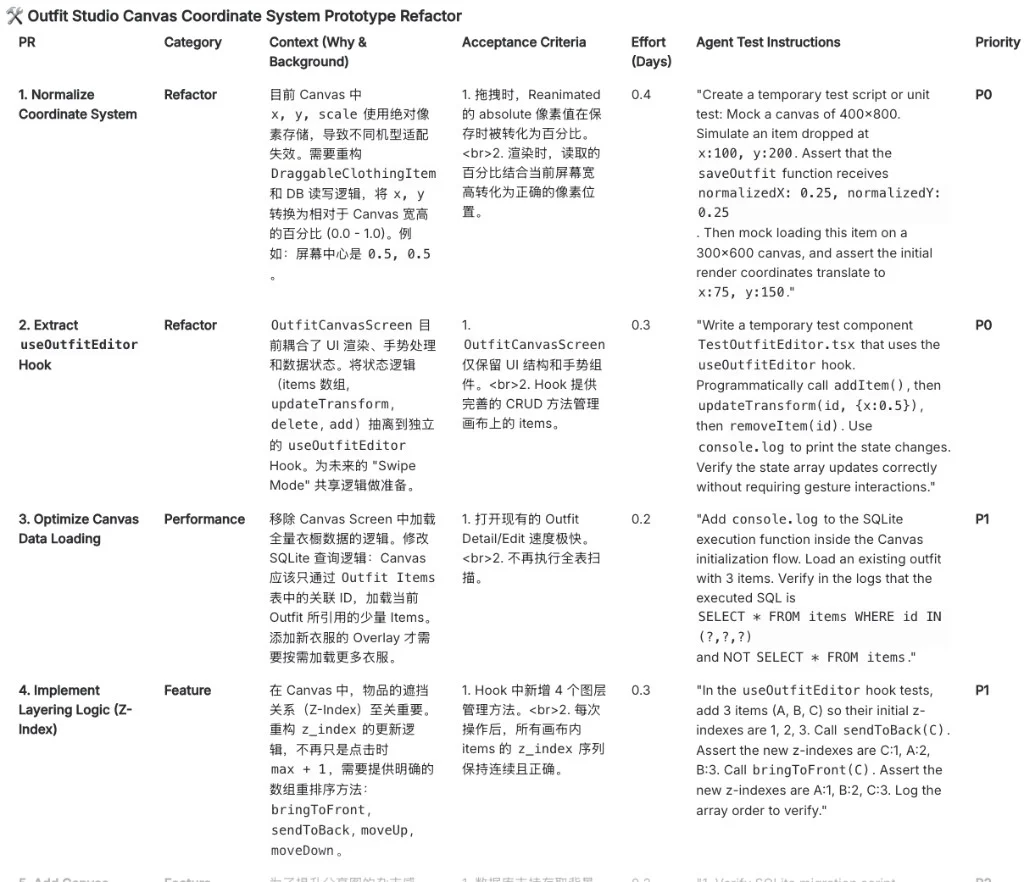
其中一个 task 的 SPEC prompt,测试指令长这样:
Simulate a Canvas of 400x800. Simulate a user dropping an item at absolute coordinates
x: 100, y: 200. Assert/Log that the system calculates the saved normalized coordinates asx: 0.25, y: 0.25. Then, simulate loading this item onto a smaller Canvas of 300x600...
完整的 SPEC prompt(点击展开,很长)
We are working on a refactoring PR for our app: "[PR] 3.17.1: Normalize Coordinate System for Outfit Canvas".

# Context & Problem Statement
Currently, the outfit canvas (`OutfitCanvasScreen.tsx` and `DraggableClothingItem.tsx`) stores item positions (`x`, `y`) and `scale` using absolute pixel values.
This causes a critical issue: an outfit created on an iPhone 14 Pro Max will look completely broken or items will render off-screen when opened on an iPhone SE, because the absolute pixel coordinates don't scale.

# Goal
We need to refactor the coordinate system so that all positions are saved to the database as normalized values (percentages between 0.0 and 1.0) relative to the canvas size.
- `normalizedX = absoluteX / canvasWidth`
- `normalizedY = absoluteY / canvasHeight`
- When rendering: `absoluteX = normalizedX * canvasWidth`

# Step-by-Step Instructions

1. EXPLORE:
First, locate and read the relevant files. Look for:
- The Outfit Item type definition (where x, y, scale are defined).
- `src/components/outfit/DraggableClothingItem.tsx` (or similar, where Reanimated gestures handle translationX/Y).
- `src/screens/OutfitCanvasScreen.tsx` (where the canvas container is rendered and where items are saved).
- The Database/Storage service where outfits are saved.

2. PLAN & IMPLEMENT:
- Update `OutfitCanvasScreen` to capture the exact `canvasWidth` and `canvasHeight` using the `onLayout` event of the main canvas container. Do not render the draggable items until these dimensions are known.
- Update `DraggableClothingItem` to accept `canvasWidth` and `canvasHeight` as props.
- Modify the Reanimated `useSharedValue` initializations: convert the incoming normalized `x` and `y` from the database into absolute pixels for the UI to render.
- Modify the `onEnd` callback of the PanGestureHandler: calculate the new normalized `x` and `y` based on the final absolute position divided by the canvas dimensions. Pass these normalized values back up via an `onChange` or `onUpdate` callback so the parent screen has the correct normalized data for saving.
- Ensure `scale` is also handled gracefully (you can leave scale as a multiplier, but ensure the base width of the clothing item image is proportional to the canvas width, e.g., base width = canvasWidth * 0.4).

3. AGENTIC TESTING (CRITICAL):
Before you declare this task done, you must prove the math works.
- Create a temporary mock test script or component (e.g., `TestCoordinates.tsx` or just add temporary `console.log` statements in the save function).
- Simulate a Canvas of 400x800.
- Simulate a user dropping an item at absolute coordinates `x: 100, y: 200`.
- Assert/Log that the system calculates the saved normalized coordinates as `x: 0.25, y: 0.25`.
- Then, simulate loading this item onto a smaller Canvas of 300x600.
- Assert/Log that the initial rendered absolute coordinates are successfully calculated as `x: 75, y: 150`.

Please start by reading the files and outlining your plan. Ask for my confirmation if you need to radically change the component props structure.
这套方法在当时确实有效。但现在回头看,它有效的原因很简单:当时的模型不够强。你不把具体实施和测试步骤喂到嘴边,它就会来回返工,返工的成本比预先写一份长 SPEC 更高。
但过去一年模型的 coding 能力涨得飞快:
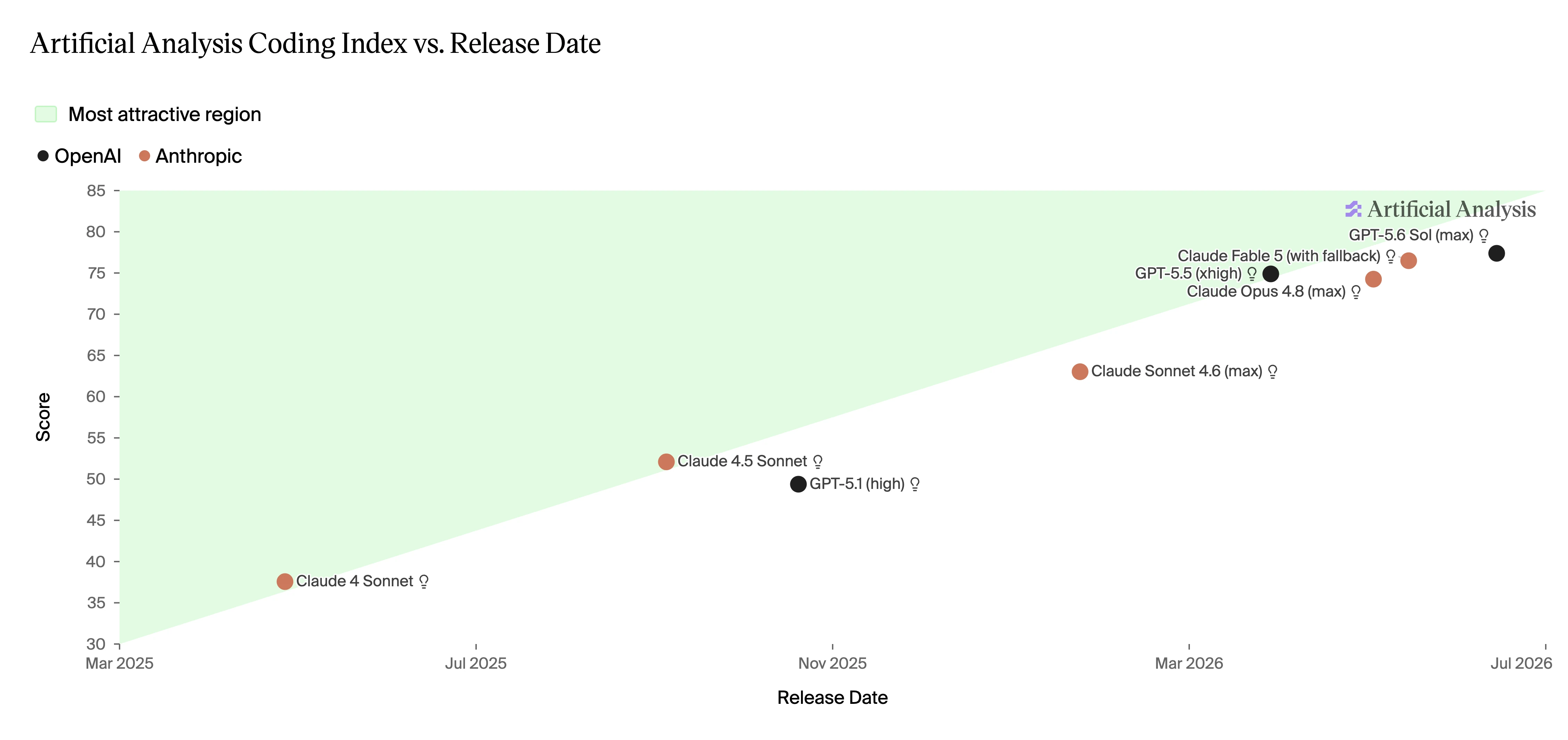
现在同样的任务,我只需要清晰定义 goal 和 context,拆分合理的 task 直接丢给 Agent 执行,通常比先写一份长计划高效得多。那些 step-by-step 的 implementation 指令,只要 task 拆分合理,模型自己就能规划的很好。
对于跨模块、存在设计选择、或者需求本身不明确的任务,我会先和 Agent 在只读模式下对齐理解再动手,比如用 Matt Pocock 的 grilling skill,让 Agent 反过来拷问我,直到我们对要做的东西达成共识。对齐的是理解,实现的细节还是留给 Agent 自己。
所以我现在越来越觉得,prompt 不是最重要的。
Coding Agent 每次启动都像一个没有记忆的新同事。决定它能不能写好代码的,不只是你怎么给它派任务,更是它进入了一个什么样的 codebase:结构是否清楚、规则是否明确、程序能不能跑起来、错误能不能被及时发现。
有意思的是,这些环境要求没有一条是新东西。可读的结构、快速的 feedback loop、独立的 code review,全是二十年来公认的优质工程实践。实践本身没变,但成本变化很大。以前 codebase 混乱,代价是一个人类新人 ramp up 慢几周,忍忍就过去了。现在你每天 spawn 二十个失忆的新同事,同样的缺陷被放大了两个数量级。以前 reviewer 和 author 天然是两个人,独立验证是组织结构自带的。现在写代码和验证代码的默认是同一个 Agent,这个分离变成了需要刻意设计的东西。
这篇文章记录一下我最近在这方面的三条实践,按 Agent 工作的时间线排:动手之前,它能不能理解这个系统;写代码的过程中,它能不能发现自己的错误;merge 之前,系统能不能拦住它漏掉的错误。
1. 让 Codebase 对 Agent 可读,也可约束
Code 和 Doc 各自负责什么
我现在给项目里的文字性内容分三层职责:
Code、types、tests 和 schema 表达系统实际做什么。ADR、design doc 和少量 comments 解释为什么这么做,当时考虑过什么替代方案。AGENTS.md 负责告诉 Agent 去哪里找、怎么运行、有哪些项目特有的约定。
原则只有一条:不要用自然语言重复代码已经能准确表达的事实。
否则同一个事实同时存在于 code 和 markdown 里,两者早晚会漂移。CodeAesthetic 在 Don't Write Comments 里解释过原因:代码有 test、compiler、linter 拦着它出错,comments 和 markdown 什么都没有,所以 comments can lie, but code cannot。Agent 面对两套互相冲突的真相,不会比人类更擅长判断哪套已经过时了。给 Agent 堆一层解释代码的 docs,看起来是在帮它,实际上是在给它埋雷。
Deep Modules 和 Progressive Disclosure
好的 codebase 不应该要求 Agent 一开始就读完整个 repository。
顶层目录展示领域边界,module interface 展示能力,types 展示数据结构。只有真的需要修改内部实现时,Agent 才继续向下探索。这就是 progressive disclosure of complexity:先让 Agent 看见地图,再看边界,最后才看实现。
Deep modules 的意义也在这里。这个概念来自 Ousterhout 的《A Philosophy of Software Design》:大量实现收在一个简单 interface 后面。复杂度被装进边界明确的 module 里,人和 Agent 就可以先围绕 interface 思考,不必每次都把全部实现装进 context。反过来,一堆可以互相 import 的浅层小模块,对人是负担,对每次都从零开始探索的 Agent 是灾难。
软性偏好写文档,硬性约束写工具
"命名尽量用我们已经在用的领域术语,别自己发明黑话",这种依赖判断力的偏好没法写成确定性的检查,放进 AGENTS.md 里当软性引导。"禁止跨越 domain layer 引用"是可以机械判定的,就该由 architecture test 去查,而不是靠 Agent 读文档时记得住。"所有 API handler 必须走 authentication"同样可以机械判定,而且后果严重,必须由 framework、lint 保证,让不合规的代码根本进不了主分支。凡是能编译成工具的约束,就不要停留在文档里。
OpenAI 在 Harness engineering 里描述过他们 agent-first 的 repository:固定依赖方向、custom linter、structural tests,连 lint 的报错信息都写成了给 Agent 的修复指令。本质上就是在把 architectural taste 编译成 Agent 无法绕过的反馈。我觉得这是很好的方向。与其用更多文字去控制 Agent,不如让环境里的规则反馈逼它自我调整。
2. 给 Agent 一个可以自我纠错的执行环境
上面解决的是 Agent 动手前能不能理解规则。但理解规则不等于写得对,接下来的问题是:Agent 写完一段代码之后,能不能自己知道写错了。
我的标准是,Agent 应该可以不经过我,独立跑完整个本地反馈循环。具体拆开:
- 程序可以用一条稳定的命令启动
- 测试足够快,快到 Agent 愿意频繁跑
- 错误信息清楚,真正的报错不用从几百行无关 log 里翻
- 异步任务、第三方调用在开发环境里可观察
- logs、metrics、traces 可以被 Agent 自己查询
这个 checklist 里每一条,其实都是给人类开发者的 DX 标准。区别在于人可以忍,Agent 不能。启动命令不稳定,人会自己 debug 环境,Agent 会在错误的方向上消耗几十轮。测试慢,人会攒一批改动跑一次,Agent 要么同样攒着(然后一次性面对一堆纠缠的错误),要么干脆不跑。反馈的速度就是 Agent 的速度上限。
如果 Agent 写完代码以后只能自己说"应该可以了",那我们并没有真正把工作委托给它。我们只是把敲键盘外包了,验证工作仍然留在自己手里。
3. 独立的 Quality Gate,不要让写代码的 Agent 成为最终裁判
上面这套 verification loop 是给写代码的 Agent 在实现过程中用的。但它还远远不够:同一个 Agent 可以写实现、写测试,然后宣布测试全部通过,但这不构成独立验证。作者给自己的作业打分,打分标准还是作者自己定的。
所以 verification loop 和 quality gate 是两个不同的东西:
| Verification loop | Quality gate | |
|---|---|---|
| 发生时间 | 实现过程中 | 准备合并时 |
| 使用者 | 写代码的 Agent | 独立 reviewer 和 CI |
| 目标 | 帮助 Agent 收敛到正确实现 | 防止错误代码进入主分支 |
| 典型工具 | 单元测试、typecheck、logs | CI、Human/AI review、evals |
merge 之前,我会在写代码的 Agent 之外再加一层独立 gate:
- CI 在干净环境中重新运行完整测试,不信任 Agent 本地跑出来的结果
- 一个 fresh-context 的 Agent review 当前 diff,确保改动符合原始 requirements 且无 regression
- 单独标记对 test、CI 和 migration 文件的修改,这些文件被改动意味着"评分标准"本身被动过了
- 对 AI 功能运行固定的 eval dataset
- 人工 review
其中:
AI review 需要信息隔离。 让另一个 Agent 看一眼说 LGTM 没有意义。Reviewer 必须是 fresh context,并且只看到四样东西:原始需求、acceptance criteria、当前 diff、测试和运行证据。它不应该看到 implementation Agent 的对话历史(如果用同样的 coding agent review 至少需要 disable Codex/Claude Code memory 做到 session 隔离)。一旦看到,它就会继承 implementation Agent 对代码的解释,review 就退化成了确认。信息隔离是独立判断的前提,这一点和人类 code review 是一样的。
Eval 是 AI feature 的 regression test。 一个 prompt 或者 model 的改动,build 全绿,类型全对,但可能让一批 use case 明显退化,而且没有任何报错。Eval 对 AI feature 的作用,和 regression test 对普通代码的作用是一样的。
最后是人的部分。我现在的分工是:确定性的部分交给机器 verify,类型、单测、接口 contract 是否符合要求,这些 AI 做得又快又好。我自己兜底的是跨模块的业务逻辑、UX、边界 case,尤其是 taste 相关的部分(UIUX 的 taste 和 code quality 的 taste),以及最终的 smoke test。
对于 full stack 项目,smoke test 刻意没放在 verification loop 里,也是我自己在做,虽然可以让 Agent 通过 browser 或者 simulator 操作 UI,但现在的 Agent 做这些操作还是很低效,一次点击截图一次推理,放进 verification loop 里会严重拖慢整个循环。而人打开 app 点两分钟,哪里不对劲一眼就能看出来。这正好是目前人相对 Agent 有比较优势的地方,没必要硬塞给 Agent。
总结
- Codebase Legibility:Agent 能理解系统。结构即地图,事实只有一个 source of truth,硬约束写进工具,文档只留偏好。
- Fast Verification Loop:Agent 能发现错误。一条命令启动,测试够快,报错够清楚,反馈的速度就是它的速度上限。
- Independent Quality Gate:系统能拦住漏掉的错误。写代码的 Agent 不做最终裁判,独立 gate 只看需求、diff 和证据。
References
- Matt Pocock, How to Make Codebases AI Agents Love, AI Hero
- Ryan Lopopolo, Harness engineering: leveraging Codex in an agent-first world, OpenAI
- CodeAesthetic, Don't Write Comments
- Matt Pocock, Delete (most of) your docs